GUIDE · October 8, 2026
N-SPORT 748 Wear OS Review: Setup, AOD, and Weather
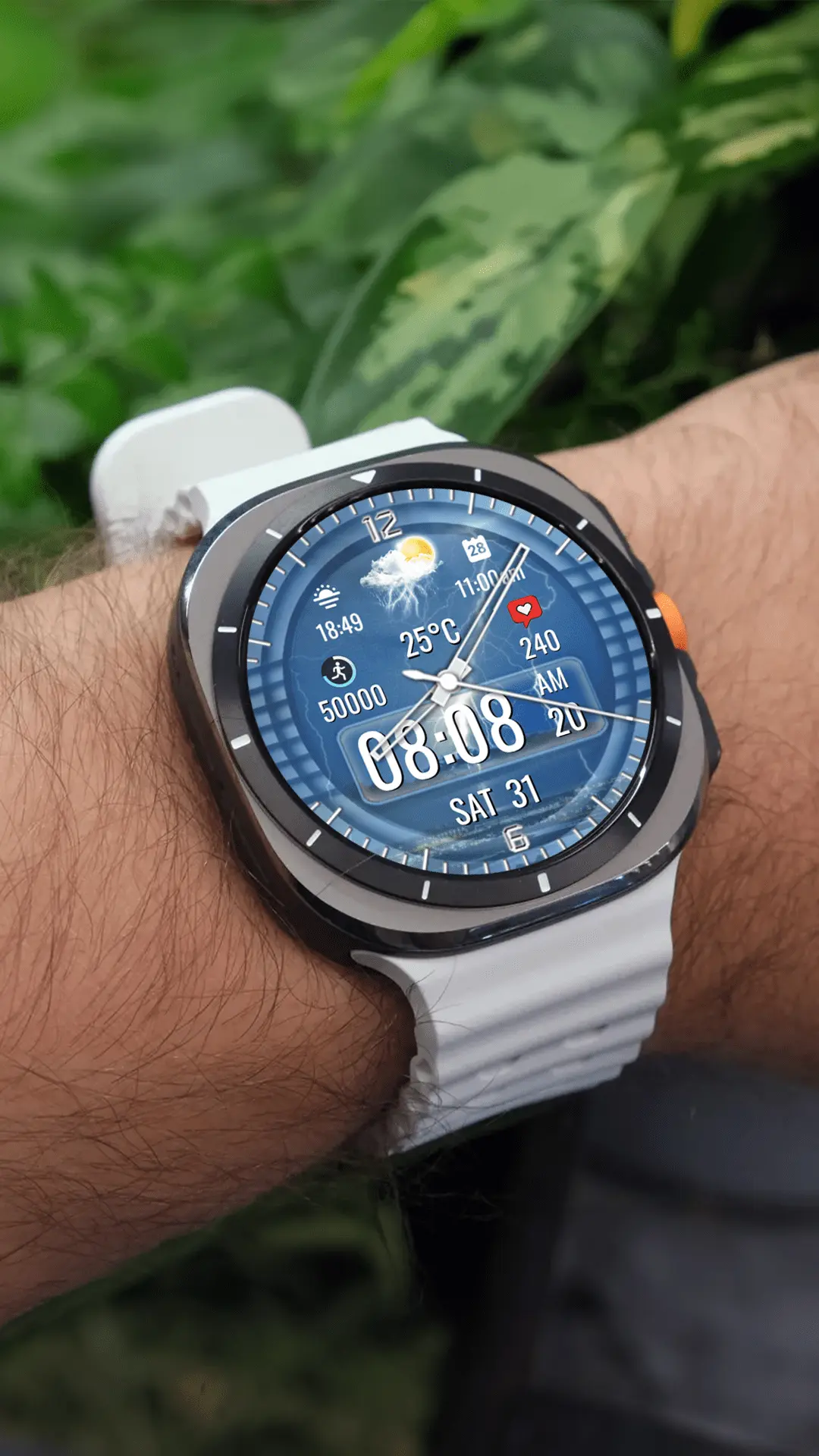
Setting up a well-balanced watch face on Wear OS requires finding the sweet spot between visual styling, complication flexibility, and battery efficiency. The N-SPORT 748 hybrid watch face delivers this balance by bringing analog clock hands, digital time, live weather icons, and daily fitness metrics onto Wear OS devices running API Level 34 or higher. Here is an in-depth review of how this hybrid dial performs in daily configuration, complication handling, and Always On Display mode across diverse Wear OS smartwatches.
Installation and Platform Requirements
The N-SPORT 748 is distributed via the Google Play Store under package ID com.watchfacestudio.n_sport748. Because the face is compiled targeting Wear OS API Level 34+, it supports modern smartwatch hardware natively. Supported watches include Samsung Galaxy Watch 4, Galaxy Watch 5, Galaxy Watch 6, Galaxy Watch 7, Galaxy Watch Ultra, and Google Pixel Watch generations. After purchasing, users can install directly onto their smartwatch from the on-watch Play Store or through the paired smartphone companion selector.
Configuring 10 Backgrounds and 2 Complications
Customization on Wear OS is straightforward and responsive. Long-pressing the watch screen opens the Wear OS customization interface, divided into styling and complication categories:
- 10 Custom Backgrounds: Allows switching between clean dark themes and textured sporty dials to suit casual, office, or workout environments without changing watch faces entirely.
- 2 Custom Complication Slots: In addition to the built-in step counter and heart rate monitor, two user-assignable complication areas allow embedding system data such as watch battery level, sunrise/sunset, UV index, or calendar events.
- 15 Weather Condition States: The dedicated weather section automatically updates graphical icons matching conditions like clear skies, rain, snow, fog, thunderstorms, or windy weather.
The complication setup uses standard Wear OS data provider architecture, ensuring full compatibility with both built-in system providers and installed third-party utility applications on your watch.
Always On Display (AOD) Performance and Battery Optimization
A frequent concern with hybrid watch faces on Wear OS is battery consumption during ambient standby. N-SPORT 748 incorporates a dedicated Always On Display mode designed to preserve screen pixels on circular OLED panels. In ambient mode, decorative background textures dim down while the analog hands, digital time, and primary indicators remain clearly visible.
This approach maintains high readability throughout the day without causing unnecessary battery drain over a full workday. By reducing the on-pixel ratio during inactive periods, the watch face complies with modern Wear OS energy guidelines, helping ensure that your smartwatch retains ample battery life until evening recharge.
Practical Recommendations for Wear OS Users
To get the most out of N-SPORT 748 on your Wear OS device, ensure that the companion weather provider has background location access enabled on your paired phone. Assign your two complication slots to complementary information not already present on the dial—such as battery percentage or next event schedule. For users seeking a refined hybrid face with verified weather tracking, N-SPORT 748 is a dependable option available on Google Play and showcased on N-SPORT Official.